앞선 포스팅에서 토픽에 Schema를 등록했다. 이제 토픽에 생성되는 메시지는 해당 스키마를 따른다.
이제 반대로 메시지를 Consume 한 뒤 역직렬화를 수행해 보자.
대상 독자
- 안전한 메시징 시스템을 구축하고자 하는 개발자.
Steps
- 메시지 소비하기
- 마무리
1. 메시지 소비하기
2. 파이썬으로 Confluent Kafka의 Consumer 구현하기 에서 Consumer 객체를 정의한 뒤 메시지를 읽고 난 뒤 json.loads를 통해 메시지를 역직렬화를 했었다.
이번 포스팅에서 할 내용은 json.loads를 통해 역직렬화가 아닌 avro deserializer를 통해 역직렬화를 수행하는 것이다.
from confluent_kafka import Consumer

consumer = Consumer({'bootstrap.servers': 'localhost:9092', 'group.id': 'test_group_id'})

topics = ["users"]
consumer.subscribe(topics)

timeout = -1 # -1 은 무한 대기, 메시지가 생성될 때까지 대기
print("consuming...")
message = consumer.poll(timeout=-1) # message 객체는 key, value, offset 등 다양한 정보를 가지고 있슴
이제 메시지의 value를 출력해 보자.
message.value()
>>> b'\x00\x00\x00\x00\x01\x08\x0cFEMALE\x0c\xea\xb4\x91\xec\x88\x98'
흠,, 직렬화가 되어서 어떤 문자열인지 확인할 수 없다. avro에 의해 serialize 된 메시지이므로 deserialize를 수행하자.
앞선 포스팅에서 했던 것처럼 SchemaRegistryClient를 정의한 뒤 AvroDeserializer를 정의하면 된다.
from confluent_kafka.schema_registry import SchemaRegistryClient
from confluent_kafka.schema_registry.avro import AvroDeserializer
from confluent_kafka.serialization import MessageField, SerializationContext

schema_registry_client = SchemaRegistryClient({"url": "http://localhost:8081"})
schema_str = schema_registry_client.get_schema(schema_id=1).schema_str
avro_deserializer = AvroDeserializer(schema_registry_client, schema_str)

user = avro_deserializer(message.value(), SerializationContext(message.topic(), MessageField.VALUE))
user
>>> {'userid': 4, 'gender': 'FEMALE', 'username': '광수'}
이제 메시지가 잘 출력된 것을 확인할 수 있다.
아래는 전체 코드이다.
토픽의 메시지를 읽는 경우는 일반적으로 스트림 처리를 위해 사용된다. 대개의 경우 토픽의 메시지를 실시간으로 처리해야 한다. 따라서 while 문으로 메시지를 계속해서 읽도록 작성하였다.
(confluent_kafka의 examples를 참고하였다.)
from confluent_kafka import Consumer
from confluent_kafka.schema_registry import SchemaRegistryClient
from confluent_kafka.schema_registry.avro import AvroDeserializer
from confluent_kafka.serialization import MessageField, SerializationContext

# Schema Registry
schema_registry_client = SchemaRegistryClient({"url": "http://localhost:8081"})
schema_str = schema_registry_client.get_schema(schema_id=1).schema_str
avro_deserializer = AvroDeserializer(schema_registry_client, schema_str)

# Consumer
topics = ["users"]
consumer = Consumer(
    {"bootstrap.servers": "localhost:9092", "group.id": "test_group_id"}
)
consumer.subscribe(topics)

# Consume Loop
while True:
    try:
        msg = consumer.poll(1.0)  # 1초동안 메시지가 없으면 None을 반환
        if msg is None:
            continue

        user = avro_deserializer(
            msg.value(), SerializationContext(msg.topic(), MessageField.VALUE)
        )
        if user is not None:
            print(f"offset: {msg.offset()}, user: {user}")
    except KeyboardInterrupt:
        break

consumer.close()
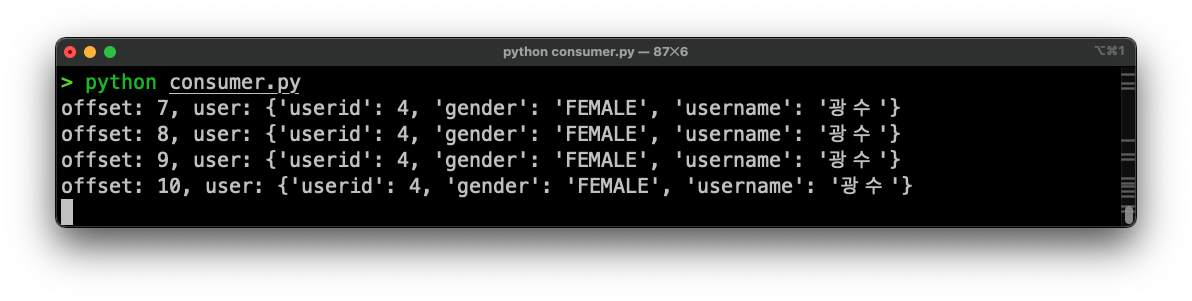
2. 마무리
이렇게 하여 Schema Registry와 함께 카프카 메시지를 안전하게 Consume 하는 방법을
살펴보았다. 토픽에 스키마를 등록하고 Avro Deserializer를 사용해 메시지를
역직렬화하였다.
지금까지 정말 간단한 내용만 설명하였는데 실제 운영 중엔 여러 가지 시나리오가
발생할 수 있다. 당연히 스키마가 변경될 수 있고 하나의 토픽에 여러 스키마를
사용하고 싶을 수도 있다. 이러한 경우에 대해서도 앞으로의 포스팅에서 다뤄보자.